If you have been managing Kubernetes clusters for a while, especially clusters running heavy AI, OCR, or data-processing workloads, you've probably run into the dreaded "Eviction Graveyard."
You run kubectl get pods, expecting to see a clean list of running microservices, and instead, you are greeted by this nightmare:
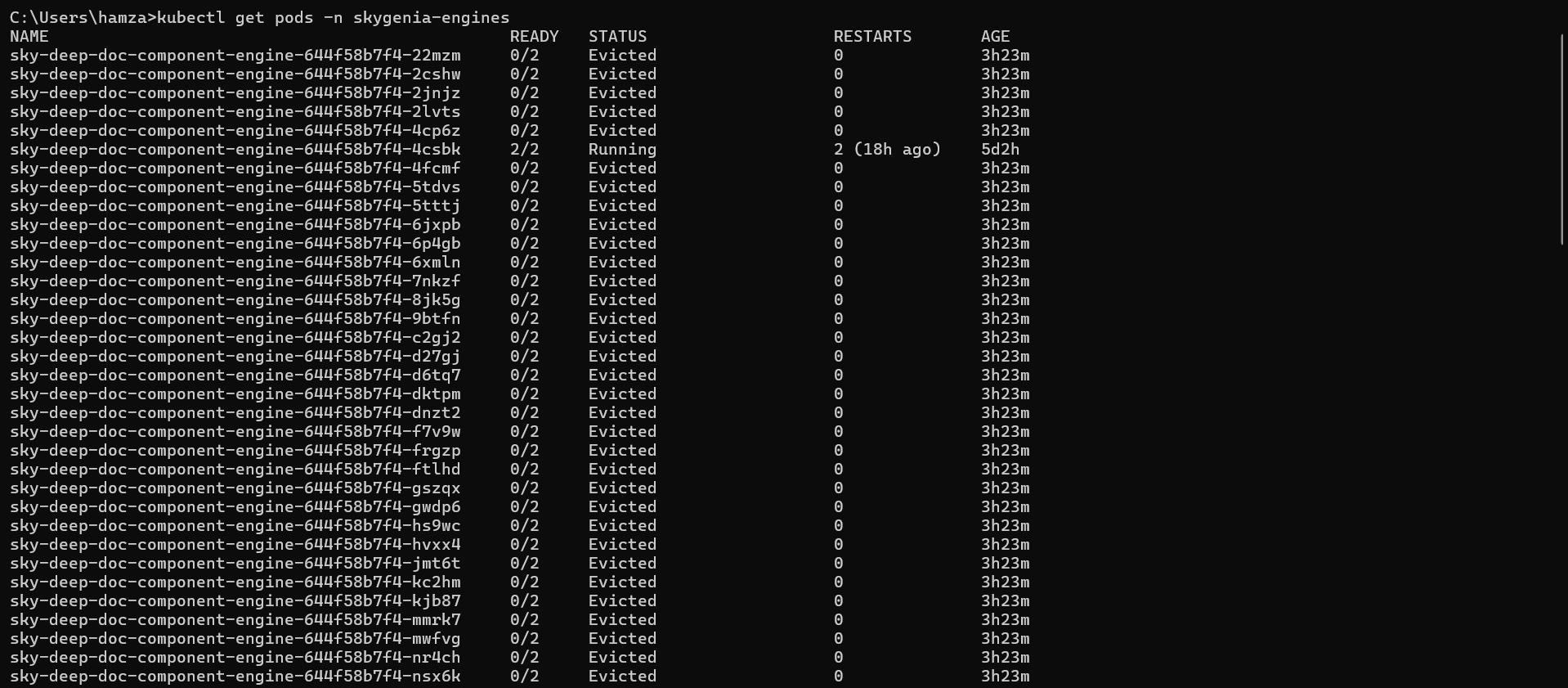
Dozens, sometimes hundreds, of dead pods cluttering your namespace.
In this post, I will break down exactly what this error means, how to clean it up instantly, and most importantly, the Enterprise Best Practices to ensure it never happens to your production cluster again.
What is the "Eviction Graveyard"?
When a pod shows as Evicted, it means the Kubernetes Worker Node completely ran out of a critical resource—usually RAM or Hard Drive space (ephemeral-storage).
To prevent the entire Linux server from crashing, the Kubelet goes into "survival mode" and aggressively assassinates the pods consuming the most resources.
However, because your pods are managed by a Deployment, Kubernetes immediately says, "Oh no, the pod died! Let me spin up a replacement." The new pod starts, fills up the hard drive again, and gets killed again. This endless loop creates the graveyard of dead pods.
If you see ContainerStatusUnknown, it means the Worker Node was struggling so badly (likely at 100% CPU or 100% Disk IO) that it temporarily lost communication with the Kubernetes Control Plane.
The Immediate Fix (Putting out the fire)
Before we fix the root cause, let's clean up your terminal and free up the node.
1. Clean up the Graveyard
Those Evicted pods are completely dead, but they are cluttering your view. You can instantly wipe all failed pods in your namespace with this command:
kubectl delete pods --field-selector status.phase=Failed -n <your-namespace>2. Free up the Node's Disk Space
Usually, this happens because local Docker/Containerd images and temporary files have filled up the node's disk. SSH into your struggling worker node and prune the unused images:
# If using RKE2/Containerd:
sudo /var/lib/rancher/rke2/bin/crictl rmi --prune

# If using standard Docker:
docker image prune -a
The Root Cause: Ephemeral-Storage
In my case, the issue was tied to AI Document Processing microservices.
When your application downloads large PDFs or images, processes them, and saves temp files to the local Linux container (/tmp), it consumes ephemeral-storage. If the app doesn't delete those files after processing, the pod bloats until it consumes the node's entire hard drive.
Enterprise Best Practices (The Permanent Fix)
In a professional DevOps environment, you never want a single rogue microservice to fill up a server's hard drive and take down neighboring applications. Here is the two-step best practice to secure your cluster.
1. The DevOps Fix: Enforce Resource Limits
You must tell Kubernetes to isolate the damage. By setting ephemeral-storage limits in your Helm Chart or Deployment YAML, you instruct Kubernetes: "If this specific pod writes more than 3GB of temporary files, kill ONLY this pod, before it threatens the rest of the node."
Add this to your deployment.yaml under the resources block:
resources:
  requests:
    cpu: "500m"
    memory: "1Gi"
    ephemeral-storage: "1Gi"  # Asks the node to guarantee 1GB of disk space
  limits:
    cpu: "2"
    memory: "4Gi"
    ephemeral-storage: "3Gi"  # Kills the pod if it exceeds 3GB of temp files!
2. The Developer Fix: Code-Level Cleanup
Infrastructure limits are the safety net, but the actual cure requires good software engineering. If your application processes files (like an AI model running inference on documents), the code must include a cleanup phase.
Ensure your developers are using standard cleanup methods in their code (e.g., Python's os.remove(temp_file_path) or tempfile.TemporaryDirectory()) as soon as the API response is sent to the user.
Conclusion
Kubernetes is incredibly resilient, but it relies on us to give it the right boundaries. By combining automated cleanup commands, strict YAML resource limits, and good developer practices, you can permanently banish the Eviction Graveyard from your cluster.
Have you run into the Eviction Graveyard before? Let me know how you solved it on LinkedIn!